

• Skip to primary navigation
  • Skip to main content
  • Skip to primary sidebar

The Heath Mullikin Project

Figuring it all out one day at a time

  • About
  • Get Social

wordpress.com

It’s Time to Start Your Blog

green light
green light
Are you ready to start your own blog?

I have been blogging for 6 years.  From MySpace to Facebook to Blogger to WordPress.com to WordPress.org I have used just about every major blogging platform.  Tumblr and Typepad are two other popular blogging tools.  A survey of the top 100 blogs shows which platform is preferred by almost half of them(48%):

 WordPress

Many people are familiar with wordpress.com which is a free solution.  You can still see one of my original blogs at dailydoseofheath.wordpress.com.  With wordpress.com you can also use your own domain which is where heathmullikin.com started several years ago.  While free is great, it isn’t always better.  With wordpress.com, you don’t have a ton of flexibility with how your blog looks and functions.  Since wordpress.com is hosting the blog for you they have most of the control.

Three years ago I started Chase Your Lion as a self-hosted wordpress.org site.  Why?  I was looking to earn some money with my blog and wordpress.com does not allow affiliate links(to sites like Amazon) or ads.  With a self hosted blog, I own the content, control the content, and can make money off the content.  A self-hosted wordpress.org blog gives you total control over how your blog looks and functions.  In early 2010, I moved this blog to a self hosted account.

There are probably three reasons you haven’t moved your blog to a self-hosted account:

  1. You don’t want to pay for your blog.
  2. You don’t know how to set it up.
  3. You don’t want to lose all your old posts from blogger or wordpress.com.
What if I told you that I make enough money from blogging to pay for my hosting each year and I will show you how to do the same?
What if I told you I will set up your blog for you on a hosted account?
What if I told you I could import all your old posts into your new blog?
Here’s what you’ll get from me when you CLICK HERE TO SIGNUP FOR BLUEHOST.COM.
1.  I will set up WordPress for you on your BLUEHOST account.  $100 value
2.  I will install the following plug-ins:  $40 value
  • WordPress SEO-helps people find your blog using search engines so you don’t have to rely on friends and family to read your blog.
  • W3 Total Cache-keeps your blog running nice and fast
  • Akismet-removes all comment spam
  • Jetpack-provides various tools including blog stats and social network sharing
  • nrelate-provides thumbnails to related posts to help people discover more of your content
3.  I will include 17 WordPress 101(WP 101) tutorial videos on how to use wordpress.  $50 value
4.  I will import posts from your old wordpress.com or blogger site.  $75 value
What’s the Cost?  

BLUEHOST.COM is the number one hosting company recommended by wordpress.org.  They have excellent 24/7 customer service, call you to verify your account set up, and do not allow pornographic sites on their servers.  Their regular price is $8.95 per month but right now you can SIGNUP FOR  12 months at $6.95($83.40), 24 months at $5.95($142.80), or 36 months at $4.95($178.20).  After your initial contract is up the cost goes up to $8.95 per month($107.40 yearly).  Did I mention that this cost includes your domain name and if you already own a domain name BLUEHOST and I will show you how to switch it over?

What’s the Catch?

There is no catch.  As an affiliate for BLUEHOST.COM I make a commission when you sign up.  If you don’t like your blog when I’m done there is a 30 day money back guarantee they offer.  If you’re not satisfied in any way they will refund all of your money and I will still email you the weekly blogging tips.  My goal here is to build connections around the blogosphere and get more people blogging.

Step 1:

Sign up for Bluehost using one of the links provided or the banner below.

Step 2:

Choose a domain.
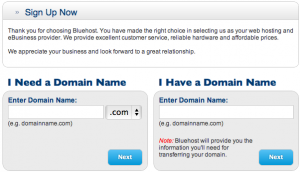
Screen Shot 2012-09-12 at 8.15.22 AM
Choose a domain

Step 3:

Choose your plan and payment options.  I personally do not choose any of the extras that are offered.
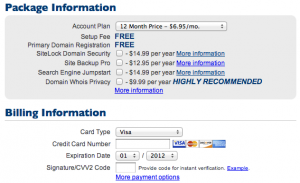
Screen Shot 2012-09-11 at 8.02.41 PM
Choose your plan and payment options.

Step 4:

Email your bluehost receipt and log in information to heath.mullikin at(@) gmail.com.  Also include your name that you will be blogging under, the Title you want to use for your blog, and what it will be about.  This information will be entered into your settings and can be changed at any time.  After I email you your wordpress log in information I will destroy the email with your bluehost information.

Step 5:

Verify your account when BLUEHOST.COM calls.

Step 6:

Start Blogging!

What are you waiting for? CLICK HERE TO START YOUR NEW BLOG AT BLUEHOST.COM

Failing Forward

Failing Forward

It’s funny how things work out sometimes.  Readers of http://www.heathmullikin.com know that I signed up with a MLM/network marketing company about 6 months ago.  John Maxwell has a book entitled, “Failing Forward”, and that pretty much sums up my experience.  When I joined that company I spent hours researching how to build my business online instead of the more traditional “ask everyone I know to join” approach.  Those hours did not go to waste as my mind and life were opened to whole new world of possibilities.  6 months ago, I didn’t know the difference between wordpress.com and wordpress.org.  I had never heard of Clickbank, SEO, Adsense, PPC, affiliate marketing, e-books, or SocialOomph.  I didn’t even have a Twitter account at the time.  Gasp!  I didn’t know who David Risley, John Chow, Ty Tribble, or Bill Crosby were.  There came a point of intersection sometime in August when what I had learned online the last 6 months met who I was created to be.  “What am I gonna do?” became chaseyourlion.com.  The education wasn’t always free and the people I learned from weren’t always believers.  They are all lion chasers in their own way, though.  What started out as a quest to make some extra money on the side has become something far more significant.  I will be getting into more detail about all of this in future posts.  And remember, don’t complain about where you are in life because it ain’t ever gonna change until you decide where you’re going.

Making Money with a Blog

I’m not sure if you realize this, but there are people who make their entire living from their blogs. I would dare say that most, if not all, of these people are blogging about something they are truly passionate about. In other words, they get paid to do and talk about something they love. Now there’s a novel idea. I’ve been getting paid to do what I love for over a decade now. However, I’m looking at other ways to provide for my family that won’t take time away from them or my ministry. I found out the hard way that free wordpress.com blogs aren’t suited, designed, or intended for making money. So, I’ve been looking into other alternatives. Blogger is also free and allows for ads, promotions, and capture pages. However, you don’t have full control over the layout and design. After doing lots of research, I’m looking into a wordpress.org blog. Lots of people use this from ministry to business experts. One of those guys who I’ve been reading is David Risley. He’s got a 3 day program called 3 Day Money that I’m currently in the middle of. It has opened my eyes to lots of new things and ideas. David is passionate about helping people make money blogging about something they are passionate about. The thing I needed the most help with figuring out how to setup a new wordpress.org blog and get hosting and a domain name(he will explain all of this). I’ve found that I’m only halfway through the course, but it’s already been well worth the price. All of this is leading to the new site/blog I will be launching soon. Not as soon as I would like, but I want to get it right.  His course is by no means a “get rich quick” deal.  It’s an education to help you work smarter at building your online blogging presence.  The only changes you’ll see here at heathmullikin.com is maybe some design stuff. I may eventually move it to wordpress.org, but just for the design options.  So, if you’re a serious blogger or just starting out, go check out David’s course and see how he can help.

Primary Sidebar

Copyright © 2026 · Smart Passive Income Pro on Genesis Framework · WordPress · Log in